


Digital Banking
Busey's Digital Banking Guide is Here!
Prepare to navigate your new online banking platform with ease.
Review the guide for login instructions, menu details, expected changes and more.
Click the image below to view the guide. Remember to check back periodically as the guide will be updated with new information as it becomes available.
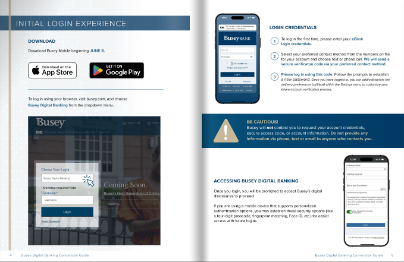
In addition, you can find details about specific changes below.
IMPORTANT
If you use eBank today, don’t create a Busey Wallet/Digital Banking account early; this could cause you additional complications and effort in June. (If you currently have both, don’t worry – we have you covered and will be in touch with more information soon.) Please continue using your eBank online and mobile app as you typically would.
Frequently Asked Questions
When will the new online banking system be available?
Busey Digital Banking and the Busey Mobile app will launch on June 8, 2026. This new, unified system will offer a singular platform for online banking, bringing Busey Wallet and eBank users together under a refreshed app and login.
Why is Busey updating the online banking system?
We are committed to continual improvement, and our improved online banking system offers a better experience for our clients, both at launch and in the future.
How is the new app different?
The app offers:
- a dashboard that is customized to your unique banking needs, whether you manage a small business, are growing your personal savings or growing wealth
- new tools, including budget management and spending analysis
- mobile-friendly 'widgets' for easy access to account info and regularly used features (like Bill Pay, etc.)
- better connections to external tools, allowing you to see non-Busey accounts, manage transfers, etc.
- sleeker, more intuitive design
We'll update this site weekly to share additional details, including screenshots about what to expect. We will also send you more information in our weekly In The Know emails--subscribe to make sure you don't miss anything.
How will this change affect me?
Busey eBank will be retired on June 5, and current eBank users will be migrated to the new and improved Busey Digital Banking platform on June 8. Current Busey Wallet users will benefit from scheduled enhancements. Both groups will need to log in to Busey Digital Banking through the browser, or update to the Busey Mobile app on or after June 8.
What do I need to do?
eBank mobile users will need to download the new app. Additional action items may be required and will be communicated directly to impacted users in advance. Please refer to the Action Items section below for steps you can take now.
What will the dashboard look like?
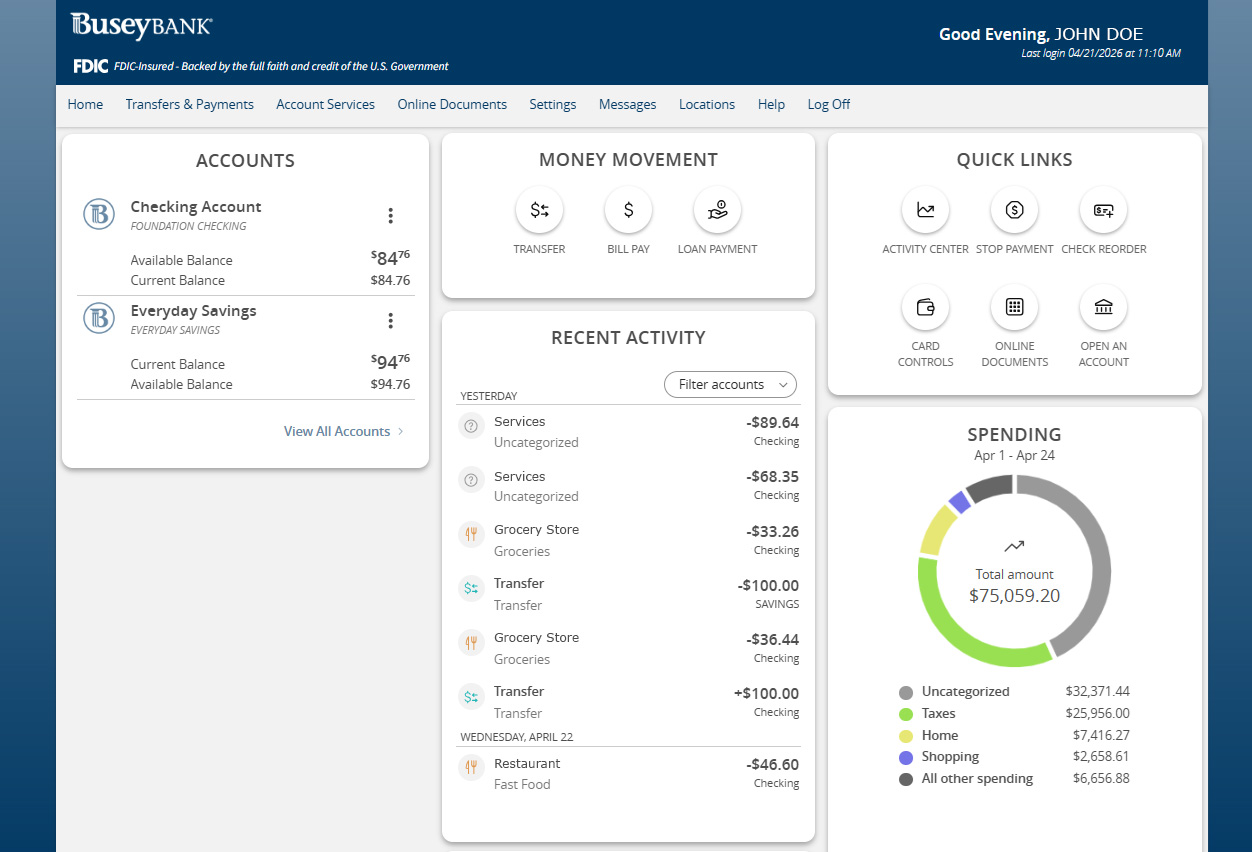
What will my initial login experience be like?
When you log in in the first time to Busey Digital Banking, you will need to enter your current eBank login credentials. You will then be guided through the initial log in experience, including account verification. You can visit our Digital Banking Guide to see what the screens and specific steps will include.
How can I update my phone number or switch to receiving the code via text?
Once you have logged in, you can add/edit/delete the delivery preferences (call/text) within the Settings menu to customize your future account verification process.
Can I use biometric login?
If you are using a mobile device that supports personalized authentication options, you may establish these security options (like a four-digit passcode, fingerprint matching, Face ID, etc.) within Busey Digital Wallet for easier access with future logins. However, for your first login, you will need to enter your eBank username and follow the directions to authenticate.
What happens after I log in?
Once you have successfully logged in, you will be prompted to accept Busey’s digital disclosures to proceed. Then you will receive some pop ups to walk you through the new experience.
Will my scheduled Bill Pay payments be affected?
No. There are no functional changes to your Bill Pay experience. Your payees, scheduled payments, payment history, and recurring payments in Bill Pay will process normally and be transferred into the new system.
I currently use Zelle®. Will that option be available in Busey Digital Banking?
Yes, Zelle® will be part of your Busey Digital Banking experience.
Note, when eBank closes at 4 p.m. CT on June 5, Zelle® will also be unavailable. Your Zelle® account will be automatically transferred to Busey Digital Banking, and you can resume using Zelle® in the new platform on Monday, June 8 at 8 a.m. CT.
When you open Zelle® for the first time, you will see a welcome screen to guide you through your account reactivation. Once verified, all your account information including payees, payment history and scheduled payments will be available. Please note that Zelle® is allowed for consumer accounts only.
How do I manage my loan payments?
Loan management tools are located under the Transfers & Payments menu option.
To make loan payments, click on Transfers & Payments > Loan Payment.
To advance your loan and transfer the funds to your Busey deposit account, select "Transfer Money."
Please note that some transfers may be subject to holds; review your disclosures for additional information.
Please note that principal-only loan payments can be made:
- from a Busey deposit account using Busey Digital Banking. To open a Busey deposit account, visit go.busey.com.
- from a non-Busey deposit account using Loan Pay, available at busey.com/LoanPay.
You may notice minor differences in the look and feel of the screens and experience.
Will my scheduled transfers be affected?
Your scheduled transfers, payees, and payment history will be moved into the new system and process normally.
Account transfer transaction history will include transactions from June 2025 through the present day.
Only transfers scheduled by you through online banking will be visible under the Transfers & Payments menu (and submenus) of Busey Digital Banking. Below are a few examples of items you may be used to seeing in the transfers window, that you will now need to view by reviewing your account's transaction history:
- Recurring transfers scheduled by a joint account holder
- Mortgage and loan payments requested through signed documents at your loan closing
- Payments you requested from your banker, such as a regular ACH transfer from your savings to your checking
How do I update my User ID?
- Busey Digital Banking App: Once logged in, tap on the Menu Icon in the lower right-hand corner. From the pop-up menu, choose Settings then Update User ID from Security to update your User ID.
- Busey Digital Banking on your internet browser: Log in. On the Dashboard, click Settings in the menu that appears. From the Settings screen, choose Update User ID from Security to update your User ID.
What if I'm already using Busey Wallet?
We will reach out with additional info soon.
- Usernames in both systems: If you're also enrolled in eBank, we'll provide guidance on how this change may uniquely affect your accounts in both systems.
- Upgraded April 8: If your Busey Wallet dashboard was upgraded on April 8, you will benefit from planned enhancements scheduled to begin this summer; we will be in touch with more info soon!
- Upgrading May 8: If you are using Busey Wallet and experienced Small Business Dashboard Updates on May 8, we will be in touch as planned enhancements are prepared to continually improve your experience.
Looking for something?
- Subscribe to Busey's In the Know emails delivered each week to ensure you receive important updates at your preferred email address.
- View past In the Know newsletters